Wheel Ten Keno Gold™
Overview: Wheel Ten Keno Gold™ lottery software includes Gail Howard's balanced lotto wheeling systems for all pick-8, pick-9, and pick-10 keno lotto games.- PC Compatible (Windows 32-bit/64-bit).
- Media Options: CD, flash drive, or download.


Product Information
Intro to Wheel Ten Keno Gold
Wheel Ten Keno Gold helps you improve your odds of winning lottery prizes for ANY pick-8 through pick-10 keno lottery game in the world You can choose a larger set of numbers to put in a wheel of your choice, and the program will give you a list of tickets to buy to guarantee that you'll win a specific minimum prize. For best results, use Advantage Gold first to choose the set of numbers that you'll wheel based on number selection strategies.
About the NEW Wheel Ten Keno Gold
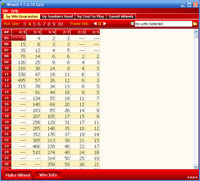
Wheel Ten Keno Gold replaces old DOS version program, Keno Wheel. Wheel Ten Keno Gold works in all (32-bit and 64-bit) versions of versions of Windows Vista, Windows 7, Windows 8, Windows 8.1, Windows 10 and Windows 11.
Once you have made a Balanced Wheel® using your best lotto numbers, you can:- View the combinations
- Optimize the wheel
- Save your wheel
- Test drive wheel combinations through our lotto history files (requires Advantage Gold or free SlhEdit to be installed) to see what you would have won had you played the wheel every game
- Print the combinations (not directly on tickets)
- Export the combinations
New, Improved, Faster, and Easier!


|
|
Download FREE DEMO of Wheel 4, 5, 6, 10 Gold See FAQ440 for more info about downloading and installing Wheel Gold in Demo Mode. |
- Minimum Requirements: Wheel Ten Keno Gold runs as a Windows application on all versions (both 32-bit and 64-bit) of Windows Vista, Windows 7, Windows 8, Windows 8.1, Windows 10, and Windows 11 whether these are installed on a PC or Mac. Note: This does not mean the software is compatible with macs, ipads, or mobile devices! It requires WINDOWS. See more about setting up a Mac with Windows here.
- New user-friendly interface. See Program Screenshots.
- More wheels available than previous Keno Wheel program.
- Improved choices for selecting numbers to go into the wheels, eg: Balanced Random, Hot/cold/newest/oldest/special mix.
- Easier to input your numbers and to arrange/re-arrange them.
- Improved Optimization algorithm that is based on multiple factors instead of just the sums or just the spread. It considers the sums, total odd/even, total high/low numbers, and spread and all four factors are weighted in Best Average and in Best Spread.
- New access to history files (limited) without requiring Advantage Gold
- Flexible export function lacking in old Keno Wheel program.
- More flexible Win Check settings for what matches to show.
- New demo mode available - download a limited version to try for free!
- Fast speed - lottery program opens and runs in a second and produces wheels as soon as you enter your numbers and press Make Wheel.
- Free automatic program updates for the current version from our web site (does not include new version upgrades).
Balanced Lottery Wheels
- 4,900 Balanced Wheel® Systems: 2,002 pick-8 wheels, 1,625 pick-9 wheels, and 1,273 pick-10 wheels.
- Wide variety of Balanced Wheel® Systems available in every price range, up to over $500 for every win guarantee, or up to 32 numbers without a Power Number (or 63 when 4 Power Numbers are used), whichever comes first.
- Has full set of Balanced Power Number® Systems with up to THREE Power Numbers® that let you wheel more lotto numbers for less money with even higher win guarantees.
- Choose from three types of listings to quickly and easily select a wheel
that matches one of the following:
- Your budget (by Cost to Play)
- The number of numbers you want to wheel (by Numbers Used)
- The win guarantee you want (by Win Guarantee)
- Has unique copyrighted built-in Balanced Games® feature, which reduces or eliminates wasted, unbalanced combinations found at the beginning and end of all other wheeling systems on the market.
- Shows the sum of each combination.
- Shows how many odd/even and low/high numbers you've chosen as you select your numbers to wheel.
- Handicap Guide shows how many times each position is used as well as how many times each PAIRED and TRIPLES positions appear in the wheel--so you can place your strongest numbers where they appear most often TOGETHER.
* Note: See Wheel 10 Gold Uses below for game types that this program works for.
Lotto Win Guarantees
- Each wheeling system has a valid minimum win guarantee. Every lotto wheel is mathematically correct. Perfect!! Guaranteed flawless!
- Find one wheel that fails its stated win guarantee, and you get DOUBLE your money back!!!
- Gives the precise win guarantee for any wheel showing the number of prizes in each prize category you would match with any possible arrangement of correct numbers in your wheel, including with or without Power Number(s)®.
More Features
Optimize, Save, Win-Check, Print, and Export Wheels
- Allows you to optimize your wheeling numbers two ways, by best average or best sums. A bar chart of your sums instantly shows if your wheel is balanced.
- Saves unlimited wheels for later win checking (limited only by hard drive space).
- Saves Balanced Wheels® up to two billion combinations.
- All saved wheels are stored in a single compressed file to conserve hard drive space.
- Built-in Saved Wheel Manager can re-open, delete, rename, win-check, and export saved wheels and show saved wheels by pick-size.
- Win-check saved wheels against numbers you provide.
- Can customize win-check results to match prizes paid by your lottery.
- Allows you to view lists of winning tickets with combination numbers to easily locate winning tickets in perhaps large groups of tickets played.
- Prints your wheels with user selectable fonts, font sizes, heading styles, and specified page ranges so you can get the most on each page or make it most readable. Does not print on lotto tickets.
- Exports your wheels to a text file in standard comma-delimited format or customizes that format to your needs.
Use Lotto History Files for FREE with Wheel Ten Keno Gold
Though Wheel Ten Keno Gold is great on its own, it is even better if you use the lotto history options. If you own our Advantage Gold software, Wheel Ten Keno Gold can work with Advantage Gold to give you more options. Or without Advantage Gold (and on 64-bit Windows), you can still use the following great options! Just install our free lotto history files and SlhEdit program (FAQ Instructions).
Lotto History Features
- Can win-check saved wheels against the last drawing of your chosen lottery.
- Automatically inserts name of history file if used in the Saved-Wheel reference field and reloads that history when a saved wheel is opened or win-checked.
- Test drives your wheel through any lottery file we offer to see what you would have won had you played the wheel every game.
- Interfaces with existing Advantage Gold installation if you have purchased and installed the program for even more history features.
Important Note: Wheel Ten Keno Gold is NOT a replacement for Advantage Gold and does not include the charts or all features of Advantage Gold. For best results, it is still recommended that you purchase Advantage Gold to strategize which numbers to include in your wheel.
Compatibility
System Requirements and Cost
- Minimum Requirements: Wheel Ten Gold runs as a Windows application on all versions (both 32-bit and 64-bit) of versions of Windows Vista, Windows 7, Windows 8, Windows 8.1, Windows 10 and Windows 11 whether these are installed on a PC or Mac (with PC emulation software).
- Publisher: Smart Luck
- Version: 4.0
- Release date of current update: March 6, 2024
- Printing: Prints on all printers that print from Windows (See printing help for more). Does not print directly on lotto tickets.
- Media: Runs on CD (shipped in a CD envelope, not a product box) or usb flash drive, or takes less than 3 MB on your hard drive.
- COST: $59.95 plus S&H (See Shipping Rate Chart). No shipping costs for Download Only software. See Shipping and Payments for more about shipping methods, time frames, and accepted payment types.
- Upgrades: If you own an older version of this program, purchase an upgrade from any Keno Wheel Version 1: $20.00 + S&H; Keno Wheel Version 2: $15.00 + S&H; or Wheel Ten Gold Version 4: $10.00. + S&H.
- Returns: Please read this entire product description page and view our Return Policy before purchasing this software.
Wheel Ten Keno Gold Game Types
Wheel 10 Gold IS FOR: Pick-8, Pick-9, or Pick-10 Keno Lotto Games.
Wheel 10 Gold wheels up to 52 of the lotto numbers in any pick-10 Keno game in the world.
Help
Advanced Help Tutorial
Wheel Gold includes a detailed instruction manual within the program. This
simple lotto tutorial can help you learn how to make wheels, test drive them, save and export them, and
work with the other features in the program. Just press F1 from any screen within the program to access help.
- Helpful hover text throughout the program, provides hints about the meaning of the information under the mouse pointer.
- Extensive context-sensitive help available with F1 key.
- You can also see our Wheel Gold Quick Start Guide FAQ here.
Frequently Asked Questions
Click on a question to view the answer. Click the question again to remove the answer.
Special Offers
Multiple Software Discount

Special Savings: Take advantage of our great discounts for lottery software when you buy Advantage Gold and/or another wheeling program with your Wheel Ten Keno Gold order (excludes upgrades). Save at least $20 off your total (up to $70 savings)!
See Discount Details.Wheel Ten Keno Gold
also bought:


- ORDER (M-F 8am-5pm EST): 1-727-441-8906
- TECH SUPPORT (M-F 1pm-5pm EST): 1-727-441-8714


 Lottery Winning Systems & Strategies
 CART
CART© Smartluck, Inc. . All rights reserved worldwide.
