A:
The Wheel Gold install program will install the Wheel Gold program and all four Wheel libraries (Wheel Four Gold, Wheel Five Gold, Wheel Six Gold, and Wheel Ten Keno Gold).
The program will work in limited Demo mode so you can try free lottery software
if you do not have the serial numbers and keys, and you can evaluate the program without cost.
When you purchase one or more programs, your serial number and installation keys will
activate the libraries you purchased.
Steps to Install Wheel Gold and Run in DEMO MODE

Download the Wheel Gold install file by clicking this link or the download button.
Open the file or save to a location you can find (like the desktop) and then click the install program
icon when it has finished downloading.
Run through the initial steps for installing the program.
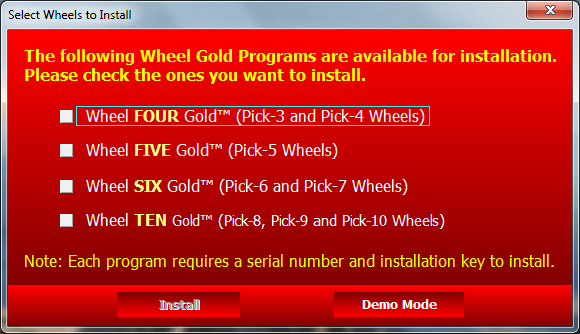
Screenshot of Wheel Gold install program
When you see the first red screen that says "Select Wheels to Install" at the top,
click the button at the bottom right that says "Demo Mode".
Do not select wheels to install unless you have already purchased codes to unlock the full version of those programs.
Then at the Demo Mode Limitations screen, choose "Use Demo Mode". Click OK when you see the intro screen.
You will now be viewing the main wheel index of Wheel Gold.
Many of the wheels will be greyed out - these are only available with purchased software.
The wheels you can use in Demo Mode are shown in a black font.
Installing Demo Mode when you already have a Wheel Gold program
If you already have a purchased Wheel Gold program installed, Demo Mode will not work for the other wheel libraries.
You will need to install the Wheel Gold program again in a separate folder,
for using Demo Mode.
- Right click on the W* icon on the desktop and choose copy.
- Paste it to the desktop by right click and choose Paste. Name it Demo Wheel
Gold though you could keep whatever name windows gives it.
- Right click on this new icon and choose Properties.
- Click on the TARGET field and move the mouse to the rightmost position (or
press the END key).
- At this point type a space then /demo
- Click OK
This shortcut will open the Wheel Gold as a demo.
The original icon will open it normally.
Using Wheel Gold
Once you've installed and run the program, use our Quick Start Guide to help you try out the program.
Wheel Gold Quick Start Guide FAQ.
Note that all options in the guide are not available in Demo Mode.
