A: Yes, you can export data from the programs so that you can work with them outside of our software.
In Advantage Gold, Wheel Gold or FFWG, use the export function.
In Advantage Plus or the old Wheel Plus programs, you can print your history charts and lotto wheels to a text file or
Word Document.
To export an Advantage Gold chart to a text file or Word document:
- Generate the lotto chart you are interested in.
- Right-click inside the chart and choose Export Grid to Text.
- Select to include All Rows or only certain rows of the chart, and All columns or specific columns.
- Select to separate cells by a comma, space, dash, or tab.
- Click the Export button.
- Advantage Gold will exit from the export window and open the Save As screen. Choose your location to save the file, the file name, and file type and press the Save button.
- Look in the directory you chose to save the file to find the exported file and open it.
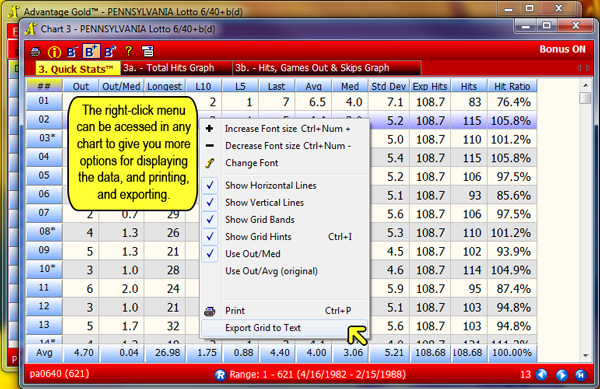
Screenshot 1
To export a wheel within Wheel Four Gold, Wheel Five Gold, Wheel Six Gold, or Wheel Ten Gold
- Save your wheel within the program.
When you see the combinations of your wheel, there is a save button at the bottom.
Click that to save.
- Then from the main menu, click the saved wheels tab
which is the right-most horizontal tab (highlighted in yellow, Screenshot 2 below)
at the top in the Wheel Gold programs.
- From the Saved Wheel screen (screenshot 2 below), highlight the saved wheel you want,
and right-click and choose Export.
- Choose the options you want and continue with export (screenshot 3 below).
- It will then prompt you to choose a location to save the file,
so be sure to select a location you can find when you're done.
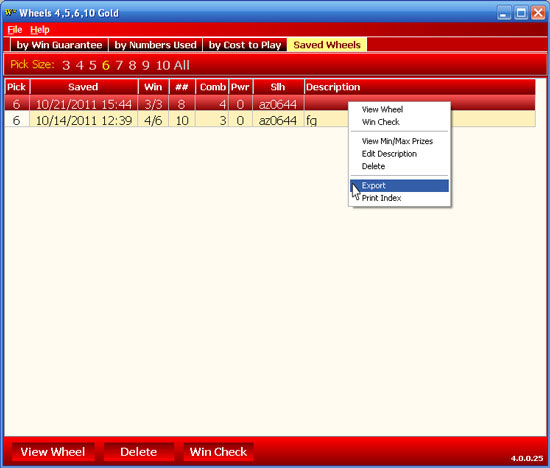
Screenshot 2
Wheel Gold Saved Wheel Screen. The Saved Wheels tab is at the top right in Wheel Gold.
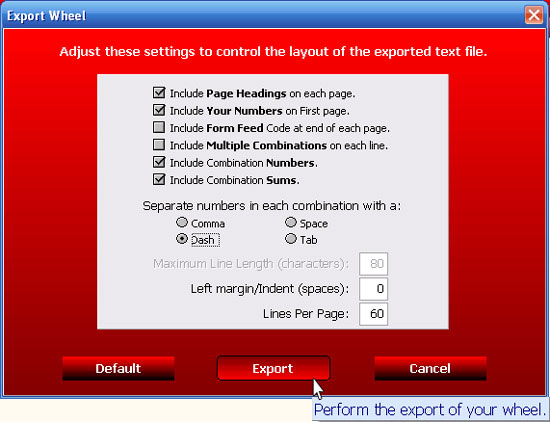
Screenshot 3
Export Options for Wheel Gold.
To export a wheel within
Filtering Full Wheel Generator or Full Wheel Generator Plus:
- Save your wheel within the program.
When you see the combinations of your wheel, there is a save button at the bottom.
Click that to save.
- Then from the main menu, click the saved wheels tab, which is a vertical tab on the left in FWGP/FFWG
- From the Saved Wheel screen (screenshot 4 below), highlight the saved wheel you want, and right-click and choose Export.
- Choose the options you want and continue with export (screenshot 5 below).
- It will then prompt you to choose a location to save the file, so be sure to select a location you can find when you're done.
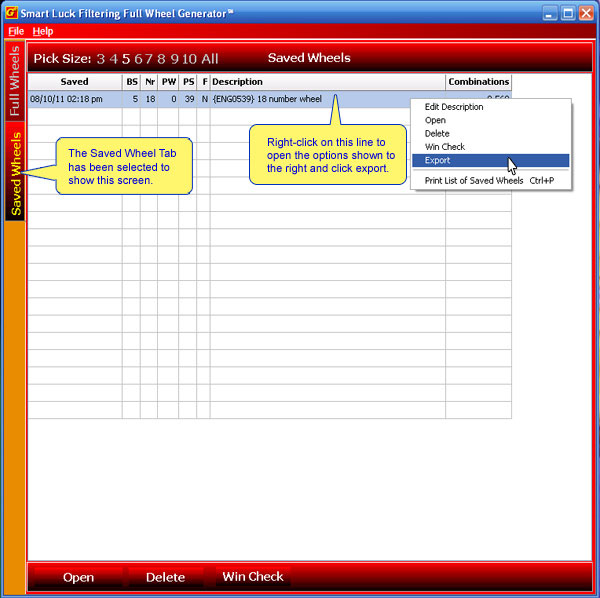
Screenshot 4
FFWG's Saved Wheel Screen.
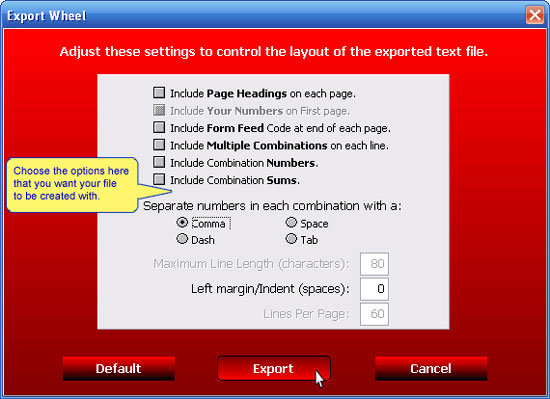
Screenshot 5
For more details, there is a page for this in the FWGP/FFWG built in help manual.
Press F1 to access Help, and go to Exporting Saved Wheels which is under the
Technical Issues section (and also linked to from the Saved Wheels page).
To export an Advantage Plus chart to a text file or Word document:
- Generate the lotto chart you are interested in.
- Type F2 - Print.
- Choose the Print option that you want for how much of the chart is printed by using the
arrow key and enter or typing the number for the option you want.
- Type F to choose Print to a Disk File (See Screenshot 6 below).
- Type in your name for the file (example: chart3.text for a text file or chart3.doc for Word)
and press Enter.
- Advantage Plus will exit from the print window, so you may think nothing happened, but your file was saved.
On your computer, go to the C:\gh folder (or wherever you have the program installed)
and find the file that you named.
You can then open it with Notepad, Word, or another text editor.
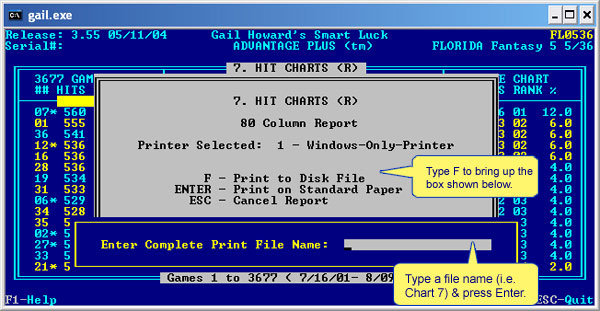
Screenshot 6
To export a Balanced Wheel® (from older version programs
Wheel Four Plus, Wheel Five Plus, Wheel Six Plus, or Keno Wheel programs)
to a text file or Word document:
- Create the combinations for your wheel like you would normally do.
- Type F2 - Print.
- Type in a reference number (this is only used within the software and can be anything) and press Enter.
- Type F3 - Modify Settings (see Screenshot 7 below).
- Use the down arrow key to move down to the "Print to:" field.
- Type in your file name (example: whl66007.txt for a text file or 66008.doc for Word) and press Enter.
- Press Enter a second time until you are back to your wheel combinations or chart screen.
- Go to the C:\gh folder (or wherever you have the program installed) and find the file that you named.
You can then open it with Notepad, Word, or another text editor.
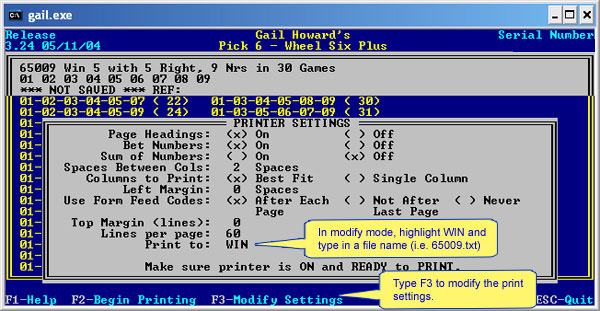
Screenshot 7
To export a Balanced Wheel®
(from older version programs Wheel Four Plus, Wheel Five Plus, Wheel Six Plus, or Keno Wheel programs) to Excel:
- First, follow the steps above for exporting a wheel to a text file.
- To get the file into MS Excel, you may have to edit out the hyphens.
Open the file you created in Word or Notepad, and do a search and replace (Ctrl-H) of the hyphen (-) with a comma (,).
Save the file and load it into Excel.
- Then, save the file in Excel as .xls format.
