A:
Since our free online histories are updated only Monday-Friday, you may want to update a game history yourself in between our updates.
Advantage Gold
To update an existing game file in Advantage Plus:
- Select a history file with the drop down on the top right.
- From the main Modify History screen, with the last drawing selected, press enter.
- A new drawing field will open with the projected date. Correct the date if necessary, type the drawing numbers, and press the save button (or File->Save History).
Advantage Plus
To update an existing game file in Advantage Plus:
- First, locate the official drawing results and find the drawings you want to update your file with.
We have a list of the USA Lotteries Links and International Lotteries Links to help you find the results.
- Open Advantage Gold. Press 1 to go into the "SELECT/ADD/DELETE/LIST Game Histories" screen.
- From option 1, highlight your game and press Enter.
If your game is one that we don't track, you can first create a new game file (see below).
- From the main menu, Press 2 to enter the "VIEW/EDIT/UPDATE/PRINT Selected Game History" Screen.
- Press F6-Update (shown at the bottom F-key menu) to enter edit mode.
- You will see a new drawing pop up with an empty box to type your results (see Screenshot 1 below).
The date should already be filled in for you, unless a recent change like a drawing that didn't occur as scheduled or a switch of days occured -
in this case, you may have to enter the date yourself for a few drawings until a pattern is established.
Dates must be entered in MM/DD/YY format. The program cannot accept dates with the day before the month.
Type in the numbers of the drawing.
- Press F10-Save and then you can Esc out to the main menu and proceed with any other actions you'd like to do.
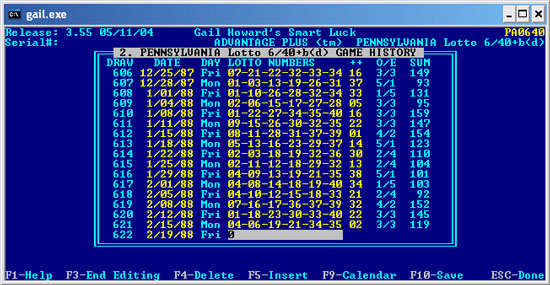
Screenshot 1
Fixing a Missed or Incorrect Drawing
You can use the arrow keys to scroll up and down through the drawings or dates and just type over existing numbers if you need to change incorrect data.
However, if you downloaded the results from us and need to change something, please contact us about the correction - be sure to give us the full game name including state/country as well as the date of the problem.
If you change the file yourself and then update from us in the future, the drawing will go back to the way it was unless we know to change it in our file.
We appreciate your help in ensuring our files are accurate.
Adding History for a Game We Don't Track
If you want to enter history for a game we don't track or keep your own game file for some reason, you will first need to set up the game file.
See how to set up a new Lotto Game at the bottom of FAQ303. Once the game is created, you can proceed with the instructions above for entering the history.
